

https://api.hairoute.ai becomes unreachable after enabling a VPN, try the following steps in order.
What to do
- Start by setting your VPN client to use a system proxy.
- If it still does not connect, switch the VPN client to TUN mode.
- If TUN mode still does not work, switch back to a system proxy and select Follow system in the application’s network proxy settings.
WorkBuddy example
In WorkBuddy, open Settings → General and find Network Proxy.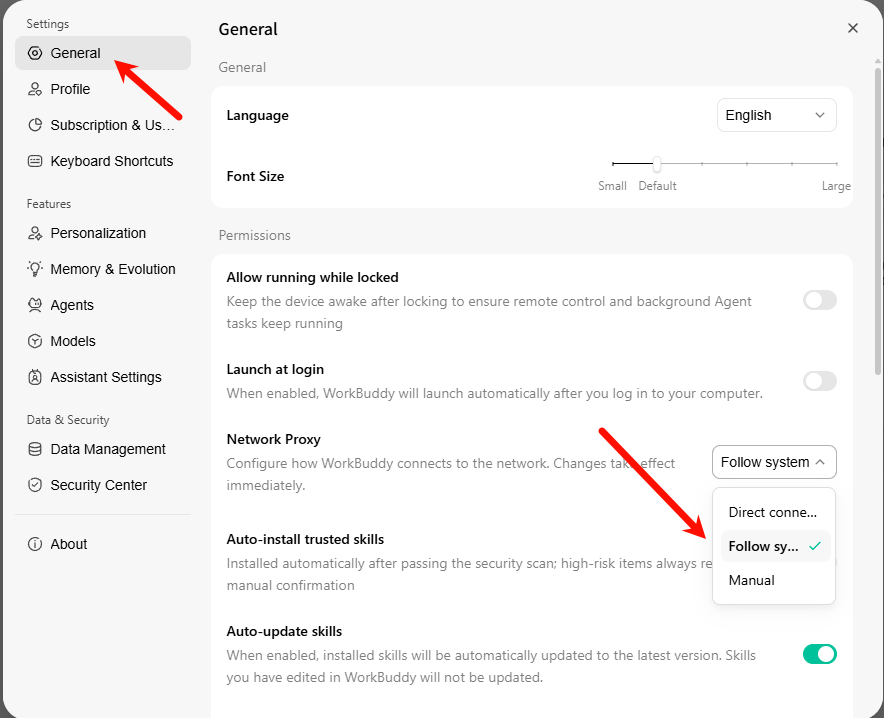
If the issue persists
Check the following:- Use the full endpoint, for example
https://api.hairoute.ai/v1/chat/completions. - Confirm that VPN rules allow access to
api.hairoute.ai. - Confirm that a firewall, enterprise network, or security product is not blocking HTTPS requests.
Related documentation
- See the WorkBuddy integration guide
- See Quick start